2026-11-23 · 14 min · 3d · lora · fine-tuning · flow-matching · diffusion-transformers · mesh
A 2:47 narrated explainer, drawn in code. Every number and picture in it is this article's own; the sources are below.
› transcript
One photo of a football boot. In the middle, what TRELLIS.2 makes of it. On the right, the same model with two small adapters. Hi, I'm Insole! Hugging Face published a guide to fine-tuning a 3D generator. It is about one model and one kind of object, and that is what makes it useful. TRELLIS.2 turns a photo into a mesh in three stages, each a flow transformer reading the same image tokens. Stage one decides which voxels are part of the object at all. Its coarse shape. Stage two makes the surface geometry for every occupied cell. The sole lives here. Stage three paints the materials. The guide leaves it frozen. The scans only have colour with the lighting baked in. And the error is in the soles, not the colours. So only the geometry stages get adapters. LoRA adds a low rank update to each targeted layer. The original weight stays frozen. The adapter learns two thin matrices whose product is the update. B starts at zero, so training begins exactly at the base model. I read the two released adapters' headers. Each holds nine point three million parameters. The guide says that number covers both. It covers one. The data is a hundred and eighty-eight scanned shoes from Google Scanned Objects. TRELLIS.2's own frozen encoders turn each mesh into latents once, so every run reuses them. Blender renders sixteen views of each shoe, and training picks one at random as the input photo. Nine shoes are held out, with their other colourways kept out of training too. Then one run per adapter on an A100. The guide's runs took seven point two and three point six hours. Now the scores. The evaluation centres and scales each mesh, but never rotates it. A shoe lying on its side scores badly even if its shape is right. Turn the base output upright, and on five held-out shoes its F-score climbs to nearly half. That part was pose. The LoRA reaches about nought point eight five on the same five. That gap is the sole. The guide's own figure shows both: the base as generated, then at its best rotation. And with the adapters, next to the scan. The headline says F-score went from about a quarter to about four fifths. Part of that is the adapters learning to stand shoes the way the scans stand. The rest is better soles, which is the part the guide was after. Pick the stage your error lives in, freeze the rest, and align your meshes before you score them. Two geometry adapters, a frozen texture stage, and pose and shape scored apart. Every source is in the full article. I'm Insole. Bye!
Why read this
Notabletop 60%Where the LoRAs go in TRELLIS.2 and why, the adapter size rebuilt from the safetensors headers, and the held-out score split into pose and shape.
- Original analysis
- Runs on a consumer GPU
- Widely used
3D & spatialMITPractitioner guide
How this was scored
- Is it new?
- 1 of 3: An incremental tweak
- Can I trust it?
- 2 of 3: Measures key facts from files, code or configs
- Can I run it?
- 2 of 3: Open code or weights with real limits
- Will I understand it?
- 2 of 3: Mechanism from first principles with figures
- Can I act on it?
- 2 of 3: A concrete recipe, numbers or comparison
- Will it last?
- 2 of 3: A reference for a year or more
- Does it affect many?
- 2 of 3: A widely used model, tool or lab release
- Only here?
- 2 of 3: A teardown or measurement few others did
Score 66 of 100, ranked 299 of 773 rated articles. Each question is answered 0–3 by hand, and a 3 is rare. How articles are scored
@ariG23498 posted it as "An end 2 end fine tuning guide for 3D model". The Hugging Face post by Suvaditya Mukherjee, merve and Pedro Cuenca calls itself "The Definitive Fine-Tuning Guide for 3D Generation Models". What it actually is: a careful, small, reproducible recipe for one model, TRELLIS.2, on one category, shoes, with containers, scripts and the trained adapters all published.
That narrowness is the useful part. Most 3D generators ship as a single checkpoint you either like or don't. This guide shows where you can cut into a multi-stage image-to-3D model, which stages to leave alone, and how to check that the cut helped.
A note on what kind of 3D this is. TRELLIS.2 does not generate Gaussian splats; it writes a sparse voxel format called O-Voxel and exports a textured mesh (GLB). And a name collision on the Hub: finetrainers/3dgs-v0 has nothing to do with the guide or with Gaussian splatting: it is a CogVideoX-5b video fine-tune on a "3D dissolve" visual-effect dataset, from January 2025, and its own card warns its "poor generalization is well-known". The guide's adapters live at suvadityamuk/trellis-2-finetune-gso.
- task
- image-to-3d
- library
- trellis2
- license
- mit
- safetensors
- 9 shards
- largest file
- 2.58 GB
- files
- 22
- downloads
- 2.4M
- likes
- 1.6K
- languages
- en
repo last modified 2025-12-27
- safetensors
- 14 shards
- largest file
- 37.4 MB
- files
- 26
- downloads
- 0
- likes
- 0
repo last modified 2026-08-21
What TRELLIS.2 does with a photo
TRELLIS.2 (paper) is Microsoft's 4B-parameter image-to-3D model, MIT-licensed. Its README times a 512³ asset at about 3 seconds on an H100 (2 s for shape, 1 s for material). After an image-encoding step, it generates in three stages, each a flow-matching transformer conditioned on the same image tokens:
- Encode the image. BiRefNet removes the background, then DINOv3 ViT-L/16 turns the image into 1024-wide feature tokens. Every later stage cross-attends to these.
- Sparse structure. A dense 1.3B DiT, the sparse-structure flow, generates a small latent of . A VAE decoder turns it into a occupancy grid: which voxels are part of the object. This is the coarse shape, the silhouette in 3D.
- Shape. A sparse 1.3B DiT, the shape flow, generates a 32-channel latent for each occupied cell. A decoder turns it into O-Voxel geometry at . This is where surface detail comes from.
- Texture. A third sparse 1.3B DiT, conditioned on the shape latent and the image, generates base colour, metallic, roughness and alpha per voxel. The pipeline combines geometry and material into a mesh.
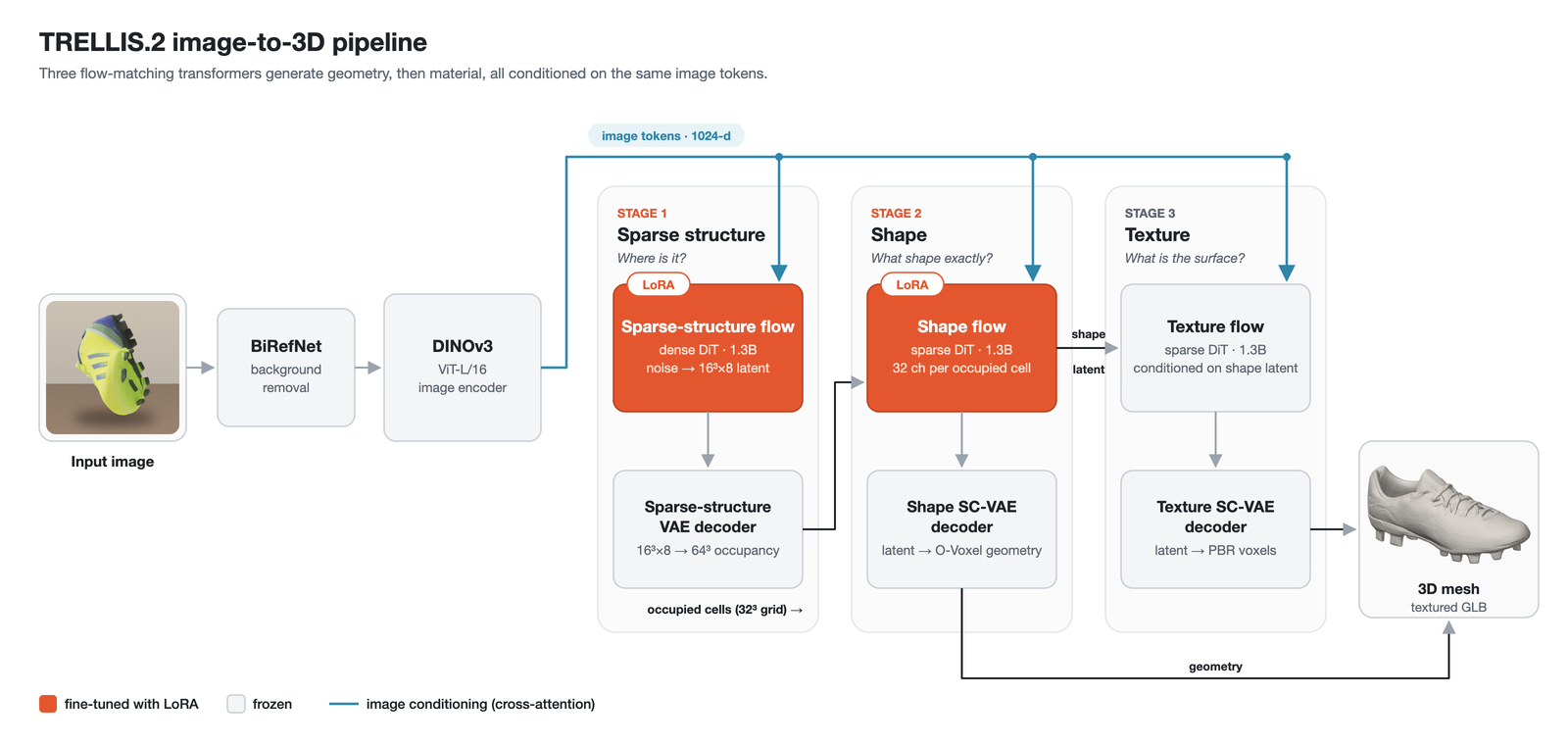
O-Voxel keeps only the voxels on the object's surface, each carrying local geometry (a mesh vertex) and material. The guide says the model uses "only approximately 10% of the voxels in the grid", which is why stages 2 and 3 can be sparse transformers while stage 1, working on a tiny dense latent, is a dense one.
Which stages to touch, and why not the third
The guide's problem statement is specific. On 188 footwear objects from Google Scanned Objects (1,030 objects in all, CC BY 4.0), the base model "usually produced shoes that looked correct, but the soles were incorrect". A sole is geometry. So the adapters go on the two geometry flows, and the texture flow is frozen.
The reason for freezing texture is the part of the guide I'd point a colleague at. GSO's scans come with diffuse colour maps that have the lighting baked in. The texture flow predicts separate physically based channels (base colour, roughness, metallic). Training it on baked colour would teach it that shadows are paint. The guide names the second risk too, catastrophic forgetting of what the base model already does well. The base textures were fine; the soles were not. So the data you have, and the error you see, pick the stage.
Freezing also keeps the cut clean. Because each stage is conditioned on the previous one's output, an adapter on stage 1 changes what stage 2 sees, and an adapter on stage 2 changes what stage 3 dresses. Nothing downstream needs retraining for that to work, since the frozen texture flow was trained on a wide distribution of shapes already.
The adapters, counted
LoRA freezes a weight and learns a low-rank update,
so a layer costs trainable parameters instead of . starts at zero, so training starts from the base model exactly.
Codebase release for TRELLIS.2 Finetuning
- license
- MIT
- branch
- master
- forks
- 0
- open issues
- 0
- source
- 138.6 kB
- commit date
- 2026-11-19
GitHub REST API, 2026-11-23 — branch, commit, commitDate, createdAt, description, forks, languages, license, openIssues, pushedAt, stars
The two presets, from the configs in the finetuning repo:
| Sparse-structure flow | Shape flow | |
|---|---|---|
| rank, alpha | 8, 16 | 16, 32 |
| targets | to_qkv, to_out, to_q, to_kv, mlp.mlp.0, mlp.mlp.2 | to_qkv, to_out, to_q, to_kv |
| timestep sampling | logit-normal (mean 1, std 1) | uniform |
| lr, batch | 1e-4 AdamW, 4 × 4 accumulation | same |
| steps | 3000 | 3000 |
The shape flow adapts attention only. Its MLPs are SparseLinear layers over sparse tensors, and PEFT's LoRA cannot wrap them, so the preset doubles the rank on the layers it can reach.
The guide says the configuration "trains approximately 9.3 million adapter parameters in total for both targeted DiTs". I read the two released adapters' safetensors headers by HTTP range request. Each one holds 9,338,880 parameters, in fp32. The sparse-structure adapter has 420 tensors, the shape adapter 300, and they land on exactly the same count by different routes. Per block, with model width 1536, DINOv3 tokens 1024 wide and an MLP 8192 wide:
- sparse structure:
- shape:
Times 30 blocks, 9,338,880 each. So 9.3 million is one adapter; both together are 18,677,760. The files are 37,400,912 bytes (sparse structure) and 37,388,848 bytes (shape): the parameter count times four bytes, plus a JSON header of about 45 KB and 33 KB. That matches the README's "about 37 MB". Against a 1.3B flow, one adapter is roughly 0.7% of the weights it modifies, by my arithmetic. A small slip in the prose, and the code is consistent with itself, but it is the kind of number people copy into their own budgets.
The data pipeline
Training needs ground-truth geometry, not images. The preprocessing container (trellis2-prep) runs eight stages per mesh: index, dump the mesh with Blender 4.5, build O-Voxel dual grids at 512 and 1024, encode shape latents with TRELLIS.2's frozen shape encoder, derive sparse-structure latents () from the 1024 shape latents, render 16 conditioning views per object with Cycles, make the held-out split, and export GLBs.
The encoders are frozen, so the latents are computed once and every training run reuses them. That is most of the cost structure: for the 188 shoes the guide reports about 1 hour of preprocessing on an a100-large job, and the README's smaller run was 12 objects in 16 minutes on an L4, about a third of it rendering.
During training each sample picks one of its 16 renders at random as the conditioning image, which is cheap augmentation over viewpoint. Nine of the 188 objects are held out and 179 are trained on. The README notes the split keeps near-duplicates together using GSO's colourway naming (..._in_Tan, ..._Color_...), so a held-out shoe's other colourway does not leak into training. With other naming, it warns, the split is effectively random.
The training loop is the one TRELLIS.2 pretrained with: rectified flow matching. With , the model predicts a velocity at and the loss is the MSE against , with 10% of conditions zeroed for classifier-free guidance. The adapters are kept in fp32 with a bf16 autocast forward, gradient checkpointing on every block, and gradient clipping at 1.0. One engineering detail matters if you adapt the code: TRELLIS.2 has a custom forward pass, so the standard PeftModel wrapper does not work, and the scripts call inject_adapter_in_model() instead.
Native and Compact Structured Latents for 3D Generation
- license
- MIT
- branch
- main
- forks
- 1.6K
- open issues
- 163
- source
- 967.1 kB
- commit date
- 2026-06-05
GitHub REST API, 2026-11-23 — branch, commit, commitDate, createdAt, description, forks, languages, license, openIssues, pushedAt, stars
Upstream TRELLIS.2 has full training scripts for all three flows but no LoRA or PEFT code anywhere in the repository; I searched it. A commenter under the post says the guide "used the trainer given in the trellis2 repo". The dataset classes and objective do come from upstream; the adapter injection, the presets, the containers and the evaluation are the guide's.
Cost
From the guide and README, on their hardware:
- Preprocessing: about 1 hour on one A100 80 GB for 188 objects.
- Training: 3000 steps each. The sparse-structure run took 7.2 hours and the shape run 3.6 hours, each on one A100 80 GB on Hugging Face Jobs. The two runs are independent and can go in parallel.
- On 24 GB (L4, A10, RTX 3090, 4090), the README says to use
--set batch_size=2 grad_accum=8, keeping the effective batch at 16, and that this setting was smoke-tested on an L4. It gives no timing for it. - Access: DINOv3 is gated under Meta's licence, so training needs a token from an account that has been granted it. Preprocessing does not.
The guide does not quote a dollar cost, and I won't make one up from list prices.
What the scores measure
The guide's training curves are honest about what loss can't tell you. The sparse-structure loss falls quickly and then slowly; the shape loss "stays at approximately the same level" for all 3000 steps.
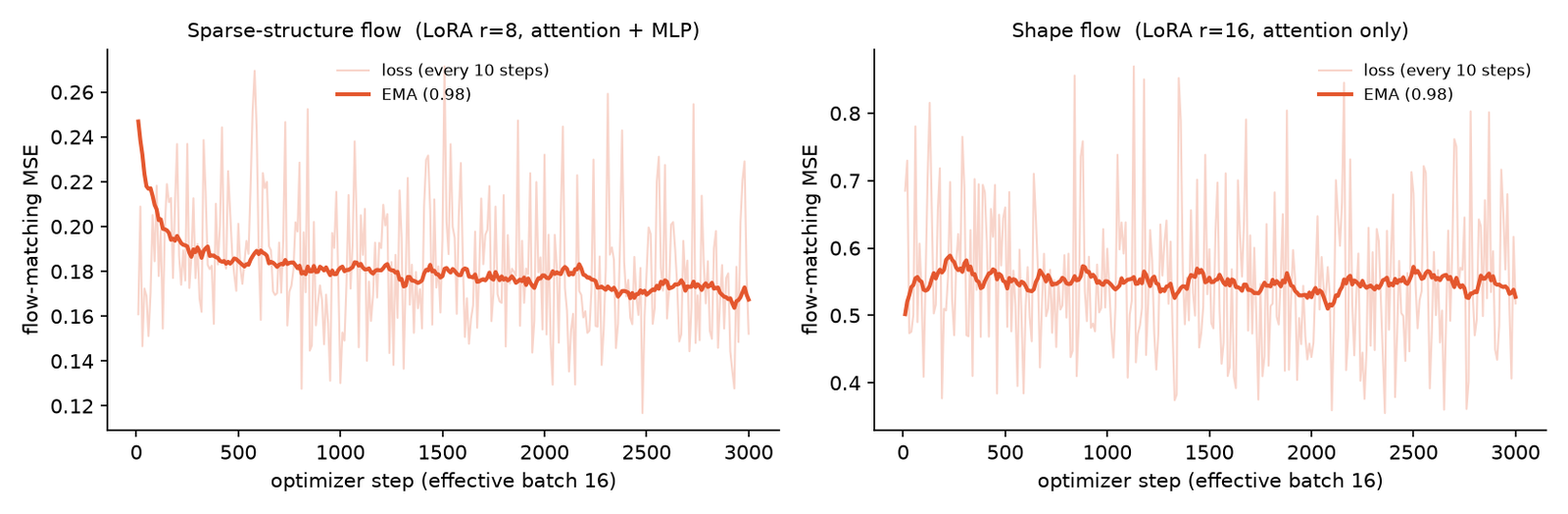
So the evidence is the held-out evaluation. scripts/eval_geometry.py takes render 000 of each held-out shoe, generates a mesh with the base model and again with both adapters, same seed, and compares each to the scan. Both meshes are normalized the same way: centre the bounding box, scale the longest side to 1. Then three metrics on 50,000 surface samples:
- Chamfer distance: mean distance to the nearest point on the other surface, both directions summed.
- F-score at 0.02: precision (generated points within 2% of the scan's bounding-box diagonal of the scan) and recall (the reverse), harmonically averaged.
- Normal consistency: mean absolute cosine between matched normals.
The released metrics.csv gives the means over the nine held-out shoes: Chamfer from 0.174 to 0.033, F-score from 0.276 to 0.803, normal consistency from 0.530 to 0.804. The LoRA's F-score is higher on all nine.
There is one step the script does not take, and the guide's own figure shows it. The normalization centres and scales but never rotates. In the figure below, the base model's meshes come out tilted, on their sides or upside down relative to the scans, while the LoRA's meshes sit in the same pose as the scans. A generated shoe that is a perfect copy of the scan but lying on its side scores badly on all three metrics. The guide knows this: its comparison figure has a column called "base, best rotation".
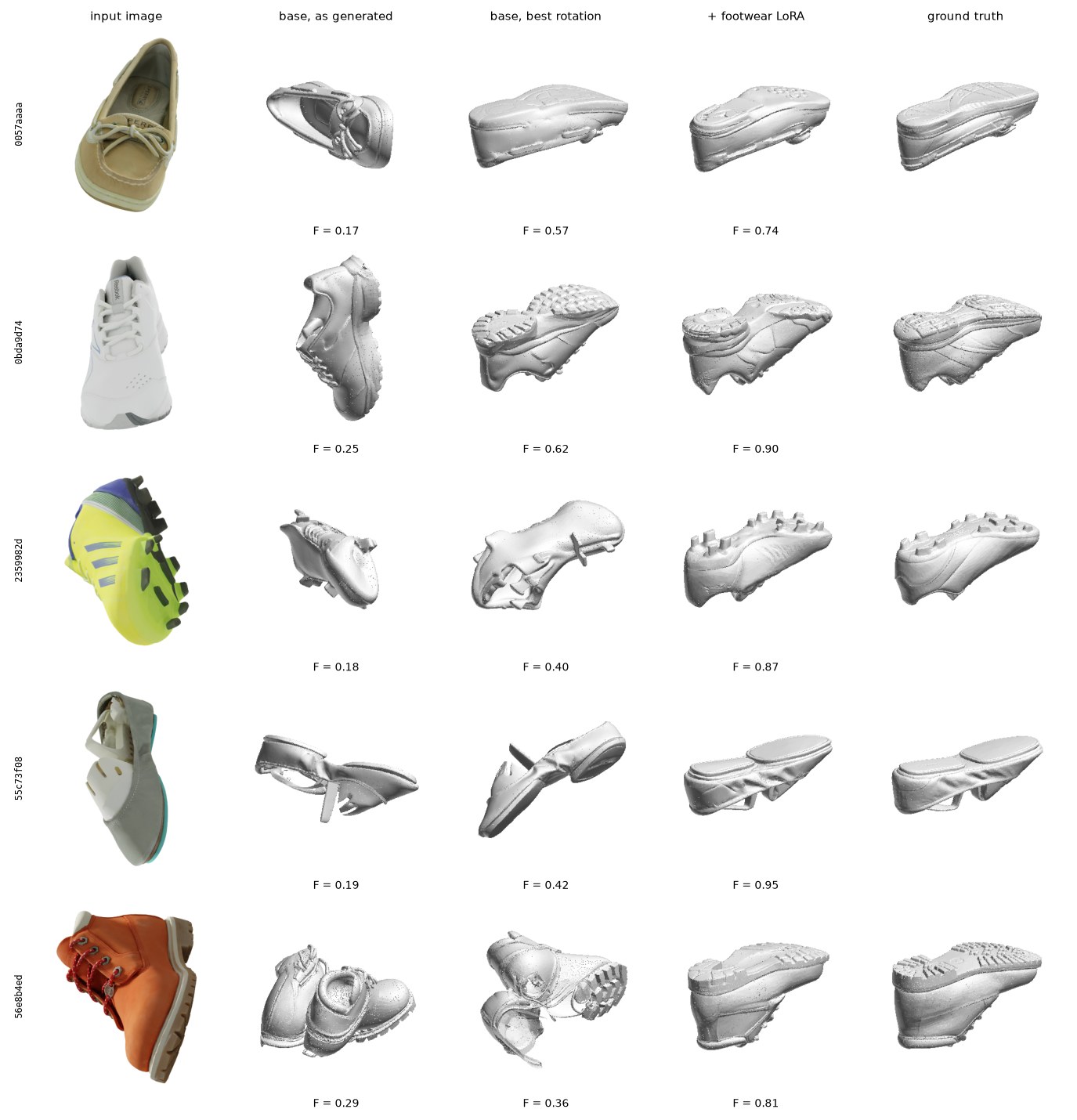
For the first shoe, the base model goes from F 0.17 as generated to 0.57 rotated, and the LoRA reaches 0.74. On these five, the base's best-rotation F-scores are 0.57, 0.62, 0.40, 0.42 and 0.36; the LoRA's are 0.74, 0.90, 0.87, 0.95 and 0.81. The guide's metrics chart puts the means side by side:
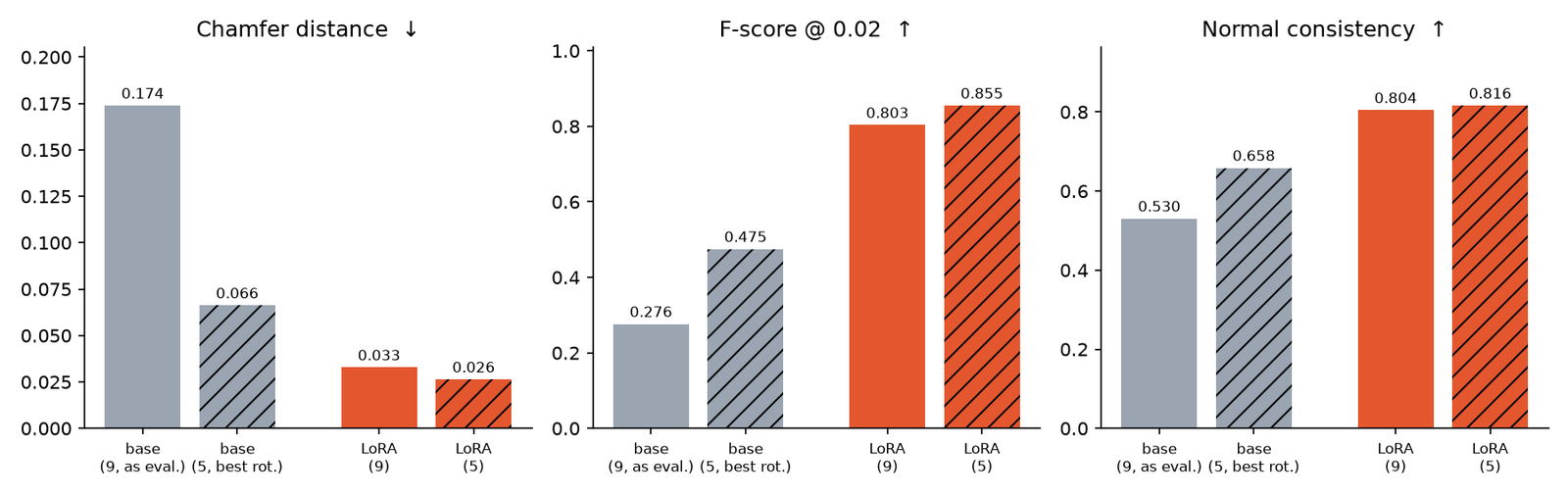
Read it carefully. On the five shoes where both numbers exist, the base model's F-score is 0.475 once it is rotated, and the LoRA's is 0.855. The headline comparison, 0.276 against 0.803, mixes two improvements: the LoRA learned to put shoes in the scans' pose, and it learned better soles. On these five, the base's as-generated F-scores average 0.22 (my mean of the figure's values), so rotation alone is worth about 0.26 of F-score and the LoRA's further gain, about 0.38, is shape, by my subtraction. Both are real. Only the second is what the guide set out to fix.
The widget below makes the distinction concrete on a 2D outline with the same normalization, thresholds and metrics.
Two caveats on the rotated numbers themselves. The guide does not say how "best rotation" was found. If it was a search over right-angle rotations, it cannot undo a tilt that sits between them, and the base shape matches at least that well. And it covers five shoes, chosen for the figure, while the headline covers nine. Neither caveat changes the conclusion that the adapters improve shape; both change how big the improvement is.
Whether the orientation part matters depends on your use. If your downstream pipeline expects assets in a canonical frame, then a LoRA that learned the frame is doing useful work, and arguably that is half the point of fine-tuning on a curated set. If you were going to align the mesh anyway, count only the shape part.
Align before you score
The recipe is sound and small enough to copy: two 37 MB adapters, latents computed once, about eleven A100-hours of training, and an evaluation script that ships with the code. The stage-selection argument (geometry error, geometry stages; baked lighting, leave texture alone) is the generalizable lesson, and it applies to any multi-stage generator, not just this one.
What I would change before trusting the number on my own data: align before scoring. Add a rotation search plus a rigid refinement to eval_geometry.py, report both, and evaluate on more than one conditioning view per object. Nine shoes at one view and one seed is a demonstration, not a measurement. The guide is upfront that its loss curves don't measure quality; the evaluation needs the same honesty about pose.
And keep the counts straight: 9.3 million parameters is one adapter, not both.
For the reality-capture side of this site, the contrast is instructive. Capture pipelines reconstruct what is in front of the camera, and a single-image splat lifts one photo with a depth model; TRELLIS.2 invents a whole object from a photo using a learned prior, and this guide is about bending that prior toward a category. If you came here for splats, the SOG splat format and Blender's splat support cover that representation.