2026-11-20 · 53 min · 3d · gaussian-splatting · depth-estimation · benchmarks
A 3:34 narrated explainer, drawn in code. Every number and picture in it is this article's own; the sources are below.
› transcript
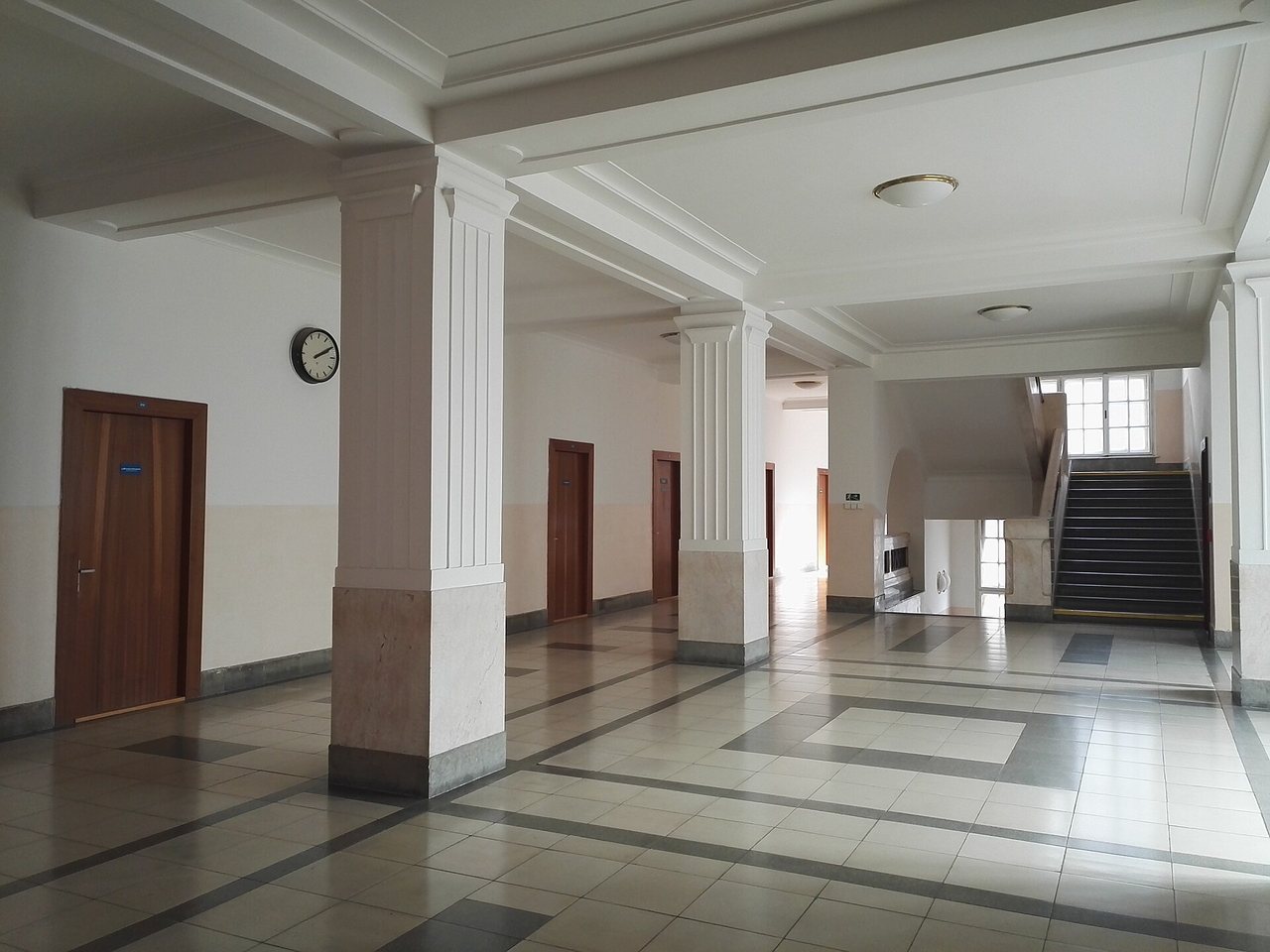
One photograph of a court hall. Over half a million Gaussians, made in one pass. Swing a little to the side, and the scene holds. Swing further, and black opens behind every pillar. Hi, I'm Bokeh. A photo tells a network how big things look. How far away they are comes from somewhere else. Apple's Depth Pro 2 predicts metric depth for photos and video, sharp at the edges and steady from frame to frame. It comes in four sizes, from twenty-four million to eight hundred seventy-two million parameters. One transformer runs over every frame at the input's own resolution. No tiles, no squashing into a square. After the first third of its blocks, frames start attending to each other. That is what keeps video steady. Single-frame methods are sharp and jittery. Video methods are steady and blurry. Depth Pro 2 sits alone at the top right. The network outputs inverse depth divided by the focal length. That is how big things look, which is all one photo holds. Multiply by a focal length to get metres. Thirty percent too long, and the room comes out thirty percent deeper. Too short, and it squashes toward the camera. The width never moves. Sideways position doesn't depend on the focal length at all. A wrong one stretches the scene along the view. Here it is on Depth Pro 2's real depth for the hall, seen from above. Longer pushes the room away, shorter pulls it in. The width readout doesn't change. And this is SHARP's thirty millimetre default, for a photo with no EXIF. So the focal length matters. Depth Pro 2 ships a twenty-three point five million parameter estimator. On ordinary photos its median error was one point four percent. At the extremes it drifts. A fixed thirty millimetres is far worse. I scored the largest model against Kinect depth on twenty-four frames, with the calibrated focal length. On average, eight point one percent relative error. But the scale isn't constant. Near things come out six percent close, far things seven percent far. At six metres, that's forty-two centimetres. SHARP is the splat model from the viral clip. It is Apple's, from December twenty twenty-five, built on the first Depth Pro. Two depth layers become two Gaussians per two-by-two pixels, and a decoder corrects every one. One million, one hundred seventy-nine thousand, six hundred forty-eight in all. Every Gaussian sits on a ray of the input camera. Move the camera, and rays slip behind edges. The second layer can fill some of that. Move further, and nothing was ever placed there. On my six photos, nine in ten second-layer Gaussians sit within one percent of the first layer's depth. And glass is a picture on a wall. The hills reflected here are flat. That's fine for what SHARP is for: a photo you can lean into, on a headset. Its depth scales exactly with the focal length it's handed, so the estimator is the piece worth adding. SplatLab edits splats of multi-view scans: label, lift out, fill the floor. From one photo there is no floor behind the table to find. One photo gives you the width. The focal length gives you the depth. Keep it, and record where it came from. Width from the photo, depth from the focal length. Thanks for watching! Every source is in the full article. I'm Bokeh. Bye!
Why read this
Hightop 30%Depth Pro 2, its focal estimator and SHARP measured on a 3090, the focal-length stretch shown on real depth, and a live single-photo splat viewer.
- Interactive explanations
- Original analysis
- Runs on a consumer GPU
3D & spatialNon-commercial licencePractitioner paper
How this was scored
- Is it new?
- 2 of 3: A real new idea, method or capability
- Can I trust it?
- 2 of 3: Measures key facts from files, code or configs
- Can I run it?
- 2 of 3: Open code or weights with real limits
- Will I understand it?
- 3 of 3: Mechanism carried by interactives built from real code or data
- Can I act on it?
- 2 of 3: A concrete recipe, numbers or comparison
- Will it last?
- 2 of 3: A reference for a year or more
- Does it affect many?
- 2 of 3: A widely used model, tool or lab release
- Only here?
- 2 of 3: A teardown or measurement few others did
Score 75 of 100, ranked 80 of 773 rated articles. Each question is answered 0–3 by hand, and a 3 is rare. How articles are scored
Four posts went past on 19 and 20 November, and they read like one story. Apple released Depth Pro 2, a family of metric depth models for photos and video. A second account announced, as if separately, a 23.5-million-parameter network that predicts a camera's focal length from one photo. A third said Apple had open-sourced a project that turns a single photo into a 3D Gaussian splat in under a second on an ordinary GPU, with a video of someone pulling a photo off an iPhone and stepping into it. A fourth showed SplatLab, which picks objects out of a splat, moves them, and fills in what was behind.
The story the four posts imply is: a better depth model, a focal length estimator, and from those two a 3D scene from any photo. Two of the pieces are what they say. The other two are older, or not what the post suggests:
- Depth Pro 2 is new: the technical report is arXiv 2611.26603, submitted 19 November, with code at apple-aiml-research/ml-depth-pro-2 and model cards at apple/DepthPro2.
- The focal length estimator is part of that same release, not a separate project. It is apple/DepthPro2-focal, it loads with every size of Depth Pro 2, and both posts carry the same 12-second hero clip from the model card.
- The single-photo splat project is SHARP, Apple's ml-sharp, from the paper "Sharp Monocular View Synthesis in Less Than a Second" (arXiv 2512.10685), published in December 2025. The post that went round this week opens with "才发现", "just found out". Its video is Bihe Xi's Apple Vision Pro app, which uses SHARP for the scene. SHARP is built on the first Depth Pro, not on Depth Pro 2, and its "under a second" is measured on an A100.
- SplatLab is Eros Carrasco's research engine for editing splats of multi-view scans. There is no paper and no public code, and it does not start from one photo.
So this is not a pipeline Apple shipped. It is two Apple models, one from this week and one eleven months old, and someone else's editor. The pairing is still worth writing up, because the reason the two models fit together is the most useful idea in either paper. A single photo does not contain distance. It contains how big things look. Distance comes from the focal length, and a wrong focal length does not shrink or inflate the 3D scene uniformly: it stretches the scene along the camera's axis and leaves its width alone. Depth Pro 2's small estimator exists to fill exactly that gap, and SHARP, when a photo has no focal length in its EXIF, logs a warning and assumes 30 mm.
I ran both on an RTX 3090: the focal estimator on 51 photos with EXIF focal lengths and on 24 frames from a calibrated RGB-D camera, all four Depth Pro 2 sizes against that camera's depth, the speed and memory of each, and SHARP on the photos the viewer below shows.
The viewer loads one of four splats SHARP made from CC0 photographs on Wikimedia Commons, only when you click. It starts at the photographer's position, where the splat lines up with the photo pixel for pixel; the Photo and Depth buttons swap in the original image and Depth Pro 2's depth map at the same crop. Then the camera swings out to one side, pauses, swings to the other and comes home. The swing stops a little past where the scene stops holding, and at its edges you see what a single photo cannot give you: streaks along every depth edge, and black where nothing was ever placed.
What one photo can and cannot tell a network
Start with a pinhole camera. A point at in the camera's frame, metres in front of it, lands on pixel
where is the focal length in pixels and the principal point, usually the image centre. Everything a network sees is on the left of those equations. A doorway 0.9 m wide, 4 m away, shot with px, spans pixels. The same doorway at 8 m with px also spans 338 pixels. The pixels are identical. Nothing in the image separates the two.
What the network can learn is how large known things look: a door, a chair, a person, a floor tile, the texture of carpet. That is a statement about , not about . Depth Pro and Depth Pro 2 are built around this. Their networks do not output metres. They output inverse depth normalised by the focal length, and the code turns that into depth with one line, which the README spells out:
depth = f_px / (width * inverse_depth) # depth_pro_2/model.py, DepthPro2.inferSo metric depth is linear in the focal length you supply. The README says it plainly: "a focal length 10% too long places everything 10% too far."
Now put the pixel back into 3D. Inverting the projection,
with the network's normalised inverse depth and the image width. The focal length cancels out of , and out of the same way. The sideways and vertical positions of every point are fixed by what the network saw. Only the distance along the optical axis depends on .
That is a stronger statement than "the scale is unknown", and it is the one that matters for anyone using these depths. A wrong focal length does not scale your room. It stretches it along the view. Give Depth Pro 2 a focal length 30% too long and the room comes out 30% deeper and exactly as wide: corners that were square are now obtuse or acute, a circular table is an ellipse, a corridor is longer and no wider. Scale errors are easy to fix with one known length. A stretch along one axis is not, because a known width tells you nothing about it; you need a known depth.
The widget does this with Depth Pro 2-H+'s real depth for the four photos in the viewer, on a 160 by 120 grid, seen from above with the camera at the bottom. Grey is the reconstruction at the focal length from the photo's EXIF; orange is the one at the focal length on the slider. The width readout does not move. The median depth moves exactly with the slider.
Where the focal length comes from
Most photos carry it. EXIF has a FocalLength tag in millimetres of the real
lens, which is useless without the sensor size, and a
FocalLengthIn35mmFilm tag: the focal length that would give the same field
of view on a 36 by 24 mm frame. Both Depth Pro 2's load_rgb and SHARP's
io.load_rgb read the second one and convert it to pixels through the
diagonal:
f_px = f_mm * np.sqrt(width**2 + height**2) / np.sqrt(36**2 + 24**2)That is exact only if the camera computed its 35 mm equivalent from the diagonal and nobody cropped the image afterwards. A screenshot, a video frame, a photo through a messaging app or off the web usually has no tag at all.
What each model does then is where they differ. Depth Pro 2 runs its focal estimator. SHARP, whose loader is otherwise identical, does this:
f_35mm = img_exif.get("FocalLengthIn35mmFilm", img_exif.get("FocalLenIn35mmFilm", None))
if f_35mm is None or f_35mm < 1:
    f_35mm = img_exif.get("FocalLength", None)
    if f_35mm is None:
        LOGGER.warn(f"Did not find focallength in exif data of {path} - Setting to 30mm.")
        f_35mm = 30.0
    if f_35mm < 10.0:
        LOGGER.info("Found focal length below 10mm, assuming it's not for 35mm.")
        # This is a very crude approximation.
        f_35mm *= 8.4
That is sharp/utils/io.py, verbatim. With no 35 mm tag it falls back to the
real lens focal length and, if that is under 10 mm (a phone), multiplies by
8.4 as a guess at the crop factor. With no focal length at all, it warns and
assumes 30 mm, a wide-ish normal lens. On a phone's main camera
(about 24 to 28 mm equivalent) that is 7 to 25% too long, and the scene comes
out that much too deep. On an ultra-wide (13 mm) it is more than twice too
long. On a 70 mm portrait shot it is 57% too short. The splat still renders
correctly from the photo's own viewpoint, because a stretch along the view is
invisible from the camera that made it. It only shows when you move, or when
you measure.
Depth Pro, the first one
Depth Pro (Bochkovskii et al., October 2024) gave metric depth from one image, sharp at object edges, in about 0.3 seconds on a V100. It ran at a fixed 1536 by 1536: the image was cut into 384-pixel patches at several scales, each through the same DINOv2-L "patch encoder", with a second ViT seeing the whole image shrunk to 384 for context, and a DPT-style decoder fusing the lot. Its focal length came from a small head on the depth network's frozen features plus its own ViT, trained afterwards on photos with EXIF but no depth. It traced hair, fur and branches better than anything before it. It also squashed every image into a square, cost two ViT-L passes over many patches, and predicted each video frame alone, so its depth flickered.
What Depth Pro 2 changes
The Depth Pro 2 paper frames the problem as a trade-off it measured across about two dozen published methods: methods for single images give sharp edges and jitter from frame to frame, methods for video are steady and blur the edges. Its Figure 2 puts every method on two axes, boundary sharpness against jitter, averaged over the Sintel and Spring video datasets. Single-image methods sit top left, multi-frame methods bottom right, and the four Depth Pro 2 sizes sit off by themselves at the top right.
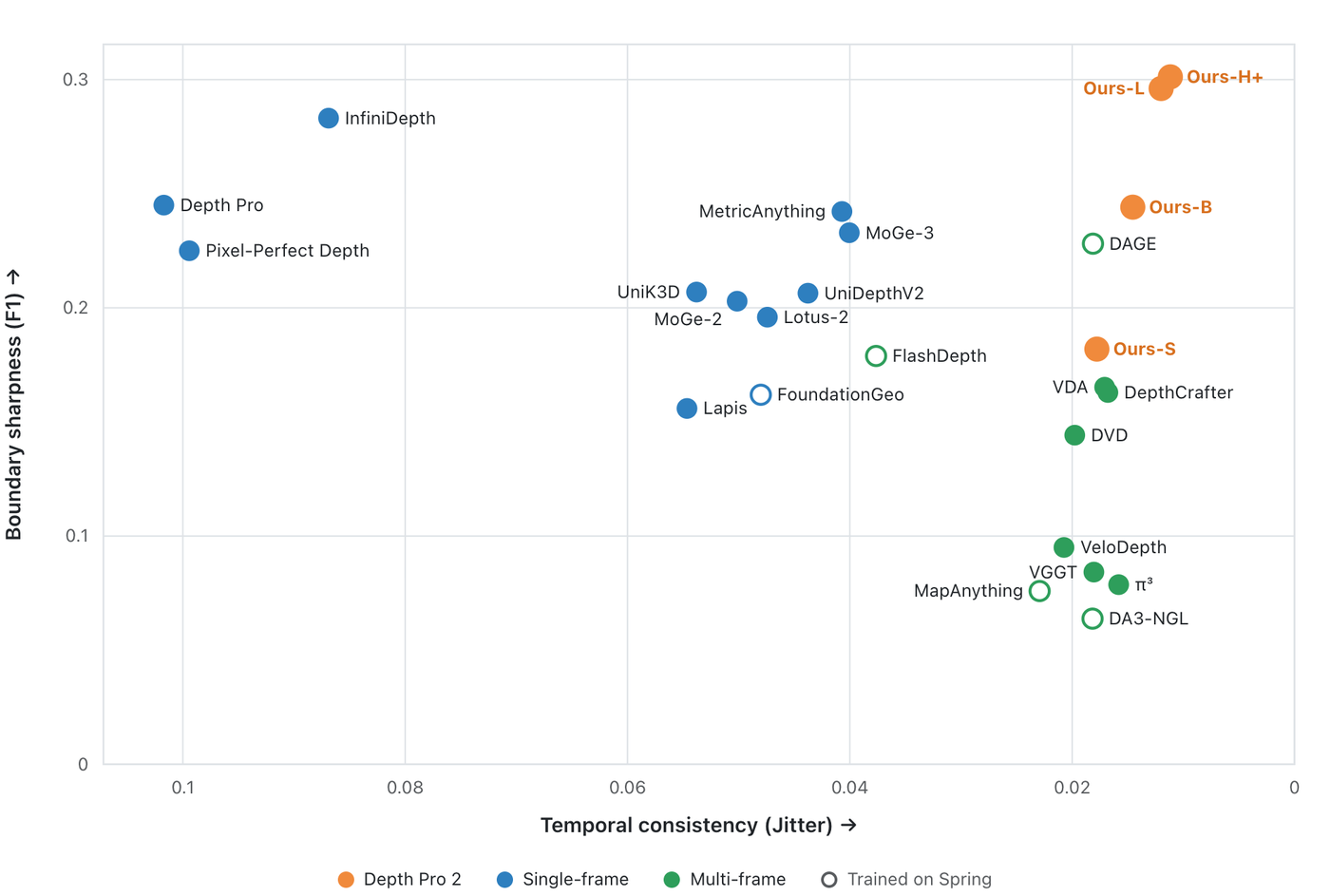
The architecture that gets there is simpler than Depth Pro's, not more complicated.
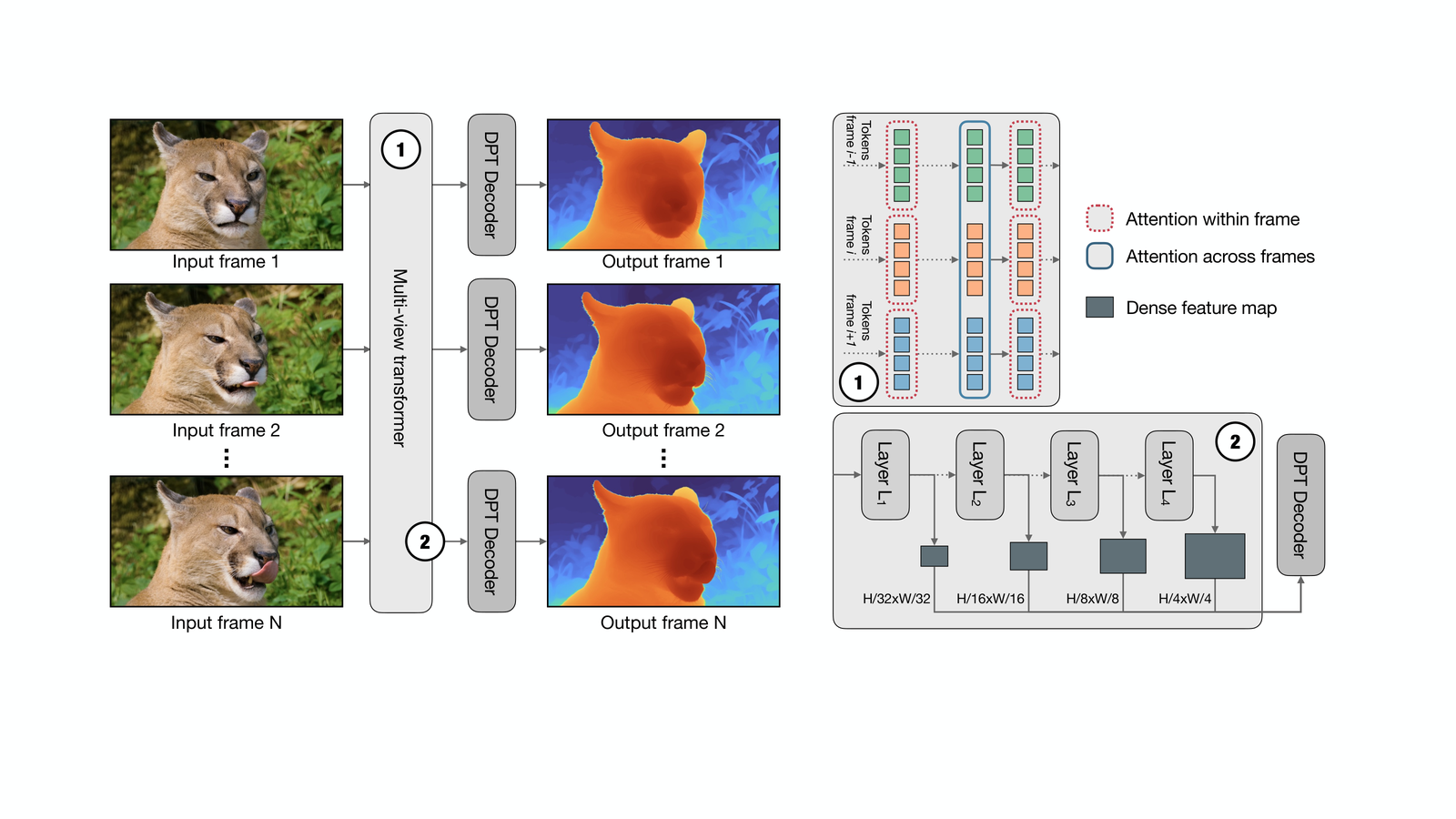
One ViT, at the input's own resolution. The tiling is gone. Depth Pro 2 starts from DINOv3 ViT-S/16, B/16, L/16 or H+/16, which were trained to give dense features at high resolution, cuts the image into 16-pixel patches at whatever size it is, and runs one transformer over all of them. The rotary position code divides both axes by the longer side,
so a 16:9 frame is not squeezed into a square of positions and the network knows its aspect ratio. Why native resolution matters is in the paper's own ablation (its Table 21): Depth Pro 2-H+ fed frames with a 360-pixel short side scores a boundary F1 of 24.1 on DynamicReplica; at 720 pixels or native it scores 57.7. Metric accuracy barely moves (95.0 against 95.4 δ1 on Waymo). Resolution buys edges, not metres.
Frames attend to each other. The same transformer takes one image or a clip of up to 32 frames. The first third of its blocks attend only within a frame. After that, blocks alternate between attention within a frame and attention across all the frames' tokens; Table 1 of the paper lists which blocks those are (5, 7, 9 and 11 of 12 for S and B; every other block from 9 or 11 onward for L and H+). There is no frame-order encoding, so the network is equivariant to shuffling the frames and the cross-frame blocks reuse the pretrained single-image attention weights with no new parameters. A single photo is a clip of one, and the cross-frame blocks then attend over one frame. Table 20 measures what the cross-frame attention buys: dropping it entirely raises jitter on DynamicReplica from 0.24 to 0.84 and lowers boundary F1 from 57.7 to 53.4, while metric δ1 falls only from 98.9 to 98.1.
A DPT decoder per frame, reading tokens from four blocks, reassembled at 1/32 to 1/4 of the input resolution, with transposed convolutions instead of bilinear upsampling. The decoder is small: 2.7M parameters for S, 31.6M for H+.
| model | total params | backbone | blocks / width | decoder params |
|---|---|---|---|---|
| Depth Pro 2-S | 24.3M | DINOv3 ViT-S/16 | 12 / 384 | 2.7M |
| Depth Pro 2-B | 96.5M | DINOv3 ViT-B/16 | 12 / 768 | 10.9M |
| Depth Pro 2-L | 334.0M | DINOv3 ViT-L/16 | 24 / 1024 | 30.9M |
| Depth Pro 2-H+ | 872.1M | DINOv3 ViT-H+/16 | 32 / 1280 | 31.6M |
The sizes are from the paper's Table 1, which excludes the focal estimator. The released checkpoints on Apple's CDN are 97 MB, 386 MB, 1.34 GB and 3.49 GB.
Training: synthetic depth, real scale, a consistency loss
The paper trains on 19 datasets "with a strong focus on synthetic ground truth". The largest is internal: 24,150,620 rendered frames of people, pets and objects with dense metric depth and poses. The second is also internal and real: 3,046,117 frames of handheld phone video with time-of-flight depth. Public sets (TartanAir, Hypersim, BEDLAM, Dynamic Replica, Waymo and others) fill the rest. Ground truth is never interpolated, because averaging depth across an edge makes exactly the flying pixels a sharp model should avoid. Batches are packed by tokens (73,728 per GPU), so a clip takes as many frames as fit, up to 32. Four losses are summed:
- a trimmed L1 on the focal-normalised inverse depth, only where the ground truth is metric: the term that teaches scale;
- the same after normalising each map to zero median and unit deviation, on everything: the MiDaS-style term that teaches shape;
- a multi-scale gradient match, only on synthetic data, where edges are exact;
- the new one, multi-view consistency: lift a pixel of frame with its predicted depth, move it into frame with the true poses, and penalise the difference from what the network predicted there, skipping pixels the ground truth says are occluded or moving.
The ablations in Table 19 say which choices carry the result. Square crops at native scale instead of any aspect ratio cost 46.6 points of metric δ1 on Waymo. A frozen DINOv3 backbone costs 13.1. Public data only costs 45.2 points on ARKitScenes, so the internal phone data is where the indoor scale comes from. Switching the consistency loss off only moves jitter from 0.36 to 0.41; the cross-frame attention does most of that work.
Video, two ways
At inference a video longer than a clip is processed in one of two modes. Buffered streaming cuts it into clips of frames overlapping by and blends the overlaps linearly; the default is , . Unbuffered streaming predicts each frame on arrival, attending to itself and the frames before it through a first-in, first-out cache of keys and values in the cross-frame layers, default . Table 22 shows the two nearly equal: for H+ on 300-frame DynamicReplica sequences, jitter 0.291 buffered and 0.300 unbuffered, boundary F1 57.4 and 57.1. A video gets one focal length, the median of the estimator's per-frame answers over the first window.
A 23.5M-parameter network that guesses the lens
The second post of the four is about this part, and it is the part I would reach for first. Depth Pro's focal head read the depth network's frozen features. Depth Pro 2's estimator is its own network, small enough to run on every frame of a stream.
It is a DINOv3 ViT-S/16 (21.6M parameters), fine-tuned end to end, with a 1.9M-parameter head on top: two transformer blocks of width 248 that read the tokens of blocks 2, 5, 8 and 11, pooled, and regress the horizontal and vertical fields of view, each squashed into 1° to 179° by a sigmoid. The input is resized so its short side is 512 pixels, never upsampled, and frames wider than 16:9 are centre-cropped to 16:9, which changes neither the short-side field of view nor the focal length in pixels. Only the short-side field of view is used, converted with
where is the length of the short side in pixels and the field of view across it. For a clip, the estimator answers per frame and the median is the clip's focal length.
It was trained on about 92 million Flickr photos with valid EXIF, an L1 loss on both angles, 120,000 steps on 32 B200s, with photometric augmentations and flips but no crops, since a crop changes the field of view. On the six photo benchmarks Depth Pro used, the paper's Table 6 reports the share of photos whose focal length comes out within 25% of the truth:
| estimator | mean δ25 | rank |
|---|---|---|
| GeoCalib | 45.5% | 6.17 |
| UniDepthV2-L | 48.8% | 5.83 |
| DA3-NGL | 53.2% | 4.67 |
| AnyCalib | 54.2% | 4.17 |
| UniK3D-L | 57.8% | 3.83 |
| Depth Pro | 71.7% | 2.33 |
| Depth Pro 2 estimator | 88.6% | 1.00 |
It ranks first on all six datasets. Within 50%, it is above 97% on four of them and at least 94% on all six.
Table 23 explains why it is a separate network. Apple first tried the cheap option, a head on each depth model's frozen encoder, which would add almost nothing to the cost. On H+ that works: a 1.9M head on frozen H+ features reaches 86.5%. On S it reaches 74.5%, and an eight-times-larger head only 78.8%. A small network fine-tuned for the one job beats them all at 88.6%, gives every size of Depth Pro 2 the same focal length for the same photo, and does not need retraining when the depth models change. For a 1080p frame it adds about 8% to the compute of Depth Pro 2-S and 0.5% to H+, and the paper times it at 118 frames per second at 1080p on a B200.
It has limits it cannot train away. It predicts the field of view a photographer would have had for a picture that looks like this one, which is a prior over cameras, not a measurement. A deliberate crop of a wide shot looks like a telephoto shot, and the estimator will say so. And it assumes a pinhole: a fisheye or an equirectangular panorama has no single focal length to find.
The estimator on 51 photos and 24 calibrated frames
I ran the estimator on two kinds of input with a known answer. The first is
51 CC0 photos from Wikimedia Commons with a FocalLengthIn35mmFilm tag,
chosen to spread from 13 mm (phone ultra-wides) to 255 mm (a telephoto
detail of a rose window), from dozens of camera models, at their native aspect ratio
and without "crop" in the title, downloaded as 1920-pixel thumbnails. The
truth is the EXIF tag turned into pixels by the same diagonal formula the
models use, which is itself only as good as the camera's rounding. The
second is 24 frames from the TUM RGB-D benchmark, whose Kinect cameras were
calibrated by the dataset's authors: ten from a freiburg3 sequence, whose
images are already undistorted, and fourteen from freiburg1 and freiburg2
sequences, whose images carry the lens's radial distortion.
| set | photos or frames | median error | within 10% | within 25% |
|---|---|---|---|---|
| all 51 photos | 51 | 7.2% | 59% | 80% |
| photos at 20 to 35 mm | 14 | 1.4% | ||
| photos at 60 mm or under | 30 | 3.9% | 87% | |
| SHARP's 30 mm guess on the same 51 | 51 | 60.5% | 27% |
The estimator is very good where most photos are taken. On the fourteen photos between 20 and 35 mm equivalent, the ordinary phone and kit-lens range, its median error is 1.4%, and all four of the viewer's photos are within about 1%. At the ends it regresses towards the middle. On the eight ultra-wide photos (13 and 16 mm) its median error is +19%: it thinks they are narrower than they are, and one Samsung ultra-wide comes out 79% too long. On the 19 long-lens photos (70 mm and up) it is 7% short on the median, with a 180 mm shot at −59%. That is what a regression trained on Flickr should do: the further a photo is from the bulk of photos, the more the answer is pulled towards the bulk. The paper's 88.6% within 25% is on its benchmark mix; on my deliberately wide spread it is 80%, and 87% if I stop at 60 mm.
SHARP's fallback is the comparison that matters for anyone feeding it photos without metadata. A fixed 30 mm is within 25% on only 27% of these photos, with a median error of 60.5%. It is right for a phone's main camera and wrong for everything else.
The calibrated frames are less flattering. On the ten undistorted freiburg3 frames the median of the per-frame estimates is 536.3 pixels against a calibrated of 539.2, 0.5% off, and running the ten frames as one clip gives 538.8, 0.1% off. But the per-frame answers jump between two values: six frames say 516 to 540 and four say 619 to 652, up to 21% long, on frames from the same camera in the same office. The median hides that, which is exactly why the paper takes a median per clip. On the distorted freiburg1 and freiburg2 frames the estimator is consistently about a quarter too long (+23.9% to +26.1% per sequence), all but one frame landing between 637 and 662 pixels against a calibrated 516 to 521. I can only guess why. Those images have uncorrected radial distortion, which a model trained on corrected phone photos has rarely seen, and 640 by 480 VGA frames are smaller than the 512-pixel short side it was trained at. Either way, it is a reminder that "metric depth without EXIF" means "metric if your camera looks like the cameras on Flickr".
How good the metres are, in the paper
The paper evaluates zero-shot, on datasets kept out of training for most methods, and reports every metric twice: with the true focal length, and with the focal length each method estimates for itself. That second column is the one that matches using a model on a photo off the internet, and it is where the estimator shows up.
On single images (Table 2, δ1: the share of pixels within a factor of 1.25 of the truth), Depth Pro 2-H+ has the best average rank of the eleven methods both ways, 2.4 with true focal lengths and 2.7 with its own. A few columns are worth reading closely:
| dataset | what it is | Depth Pro 2-H+, true f | its own f | Depth Pro, own f |
|---|---|---|---|---|
| iBims | indoor rooms, laser scan | 94.4 | 86.6 | 82.9 |
| ETH3D | indoor and outdoor, laser scan | 97.8 | 91.8 | 41.0 |
| KITTI | driving, LiDAR | 98.2 | 87.9 | 82.7 |
| HAMMER | indoor objects, includes specular | 89.4 | 86.3 | 55.2 |
| Booster | transparent and specular surfaces | 65.7 | 43.1 | 59.0 |
| Sintel | synthetic film | 60.2 | 43.4 | 30.1 |
With the true focal length the model is good almost everywhere; swapping in its own estimate costs up to 23 points (and on Middlebury and Spring it does better than the true focal length), which is the focal estimator's error propagating through the depth exactly as the equation says it must. And Booster, which is a benchmark built of glass, mirrors and shiny objects, is where it is weakest: 65.7 with the true focal length, 43.1 with its own, and the older Depth Pro is ahead there with its own estimate. Glass is the hardest case for any monocular depth model, because the network has to decide whether to report the glass or what is behind it, and the ground truth decides one way.
On video clips (Table 3, the four datasets that have video), H+ ranks first on average with an average rank of 1.0 using true focal lengths and 1.2 with its own. On DyDToF it scores 94.8 δ1 with its own focal length against 86.2 with the true one. The paper does not comment on it. A median over 50 frames is at least a steadier estimate than any single frame's.
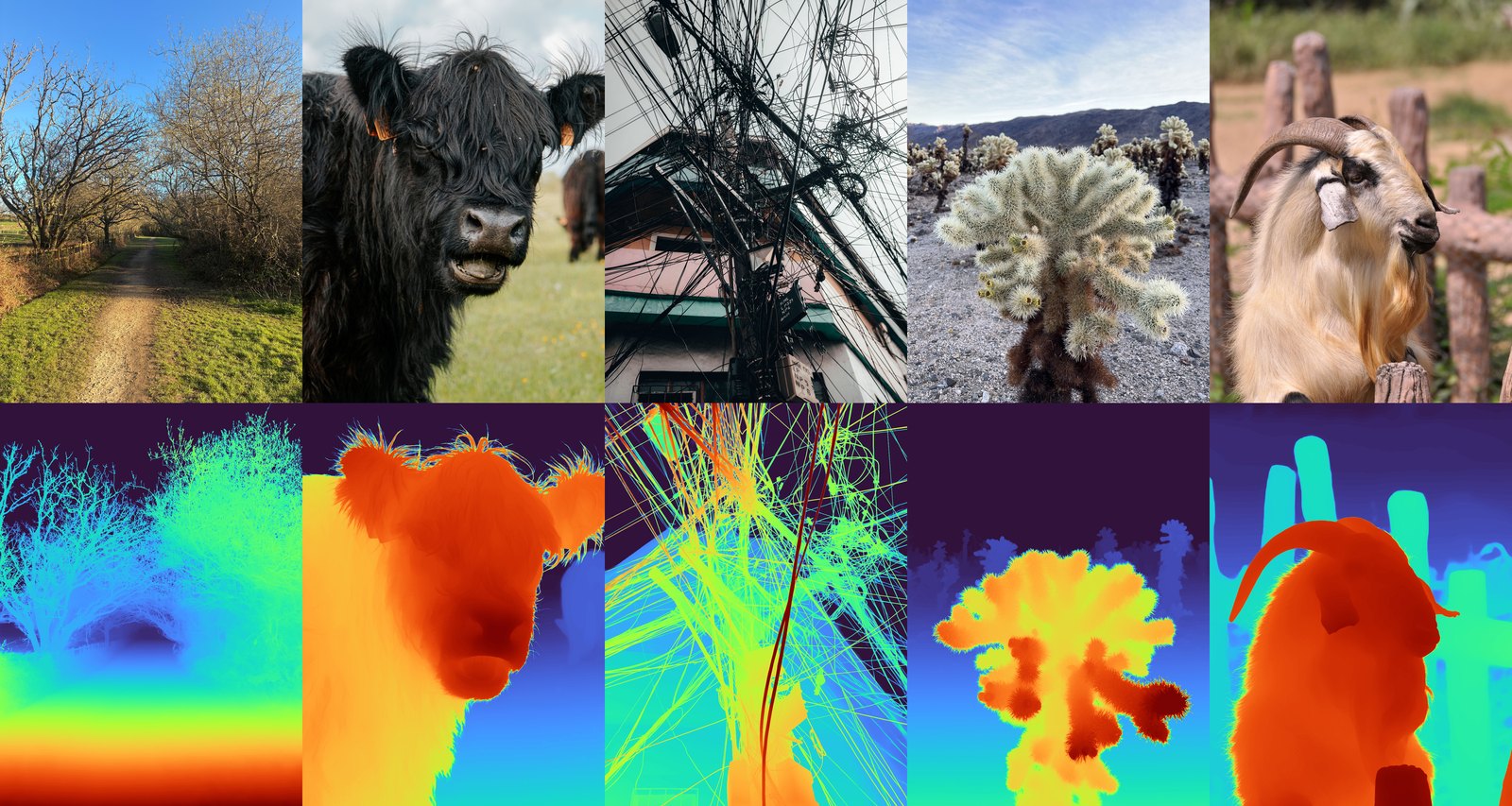
The sharpness numbers (Table 4, boundary F1) put H+ first on average among 22 methods on single images, rank 1.6, with InfiniDepth next at 3.0 and Depth Pro at 5.4. The jitter numbers (Table 5) put it first among 25, 1.39 and 0.86 on Sintel and Spring (scaled by 100) against Depth Pro's 11.26 and 8.99, an eight-to-tenfold steadier depth.
On DIODE, the paper notes, most of Depth Pro 2's absolute error comes from sky seen through bare branches: the laser marked the branch, the model predicted sky, which it returns as infinite depth. Anything downstream has to clip it.
Against Depth Anything, MoGe and VGGT
Depth Anything. Version 2 predicts relative depth: good shape, no metres. Version 3 (the tables' DA3-NGL) is a multi-view geometry model that also gives metric depth; the site has traced where its metres come from in a ROS 2 wrapper, a fixed 300-pixel focal normalisation, the same idea as Depth Pro's with the focal length handled outside the model. In Depth Pro 2's tables DA3-NGL is strong with true intrinsics (96.1 on iBims) and weak with its own (50.6 on KITTI), near the bottom on boundary sharpness (average rank 18.2 of 22), and at 1.0 frame per second at 1080p, out of memory at 4K, on a B200. InfiniSplat 2 builds splats on a frozen DA3 and shows what those depths do in a splat.
MoGe. MoGe-2 and MoGe-3 predict an affine-invariant point map plus a metric scale and recover the camera from the point map. They are sharp (MoGe-3-G is fourth on boundary F1, just ahead of Depth Pro), but their own-focal numbers fall away on unusual cameras: MoGe-2-L from 91.5 to 42.7 δ1 on KITTI. MetricTrail uses MoGe-2's metric depth inside visual odometry, exactly where that matters.
VGGT. VGGT, π³, MapAnything and VGGT-Ω solve for cameras and geometry of an image set in one pass. They are steady on video (VGGT-Ω-1B jitter 2.36 and 0.99) and blurry at edges because they run at reduced resolution: a boundary F1 of 3.7 on iBims against Depth Pro 2-H+'s 20.5, and 68.0 GiB for a 32-frame 1080p clip on VGGT-1B. For a multi-image capture they are still the right tool, since they give you the cameras. For one photo, or depth on frames whose poses you already have, Depth Pro 2 is sharper, steadier and much cheaper.
All of these numbers are the paper's, run by Apple with each method's official code. That is the usual arrangement, and the usual reason to check a few yourself, which is the next section.
How good the metres are, on my frames
The paper deliberately leaves out datasets captured with a Kinect, "due to noisy, biased, and incomplete ground truth". That is fair, and it is also what I could download in a few megabytes, so read what follows with that in mind: the ground truth is a structured-light sensor good to a few centimetres at one or two metres and worse beyond, with holes at edges and on dark or shiny surfaces. I scored only pixels where the sensor reported between 0.1 and 10 m. The 24 TUM frames above are offices and desks between about half a metre and six metres away.
Each size of Depth Pro 2 ran on each frame alone, at its native 640 by 480, first with the calibrated focal length and then with the estimator's (the second needs no second pass, since depth is linear in ). I report the median ratio of predicted to true depth (the scale), AbsRel and δ1 as the paper does, and AbsRel after dividing out each frame's median ratio (the shape, with scale removed).
| model | median ratio | AbsRel | δ1 | AbsRel, scale removed | with its own focal: ratio, AbsRel |
|---|---|---|---|---|---|
| Depth Pro 2-S | 0.922 | 0.141 | 80.5 | 0.091 | 1.128, 0.202 |
| Depth Pro 2-B | 0.960 | 0.112 | 91.3 | 0.066 | 1.126, 0.176 |
| Depth Pro 2-L | 0.979 | 0.082 | 96.0 | 0.062 | 1.178, 0.188 |
| Depth Pro 2-H+ | 0.945 | 0.081 | 97.6 | 0.054 | 1.158, 0.169 |
With the right focal length, H+ gets 97.6% of pixels within 25% of the sensor and an average relative error of 8.1%, of which 5.4 points are shape and the rest a scale that reads 5.5% short on the median frame. The sizes line up the way the paper says: S is clearly worse (14.1%), L and H+ are close. With the estimator's focal length every size reads 13 to 18% long, and that is the estimator's quarter-too-long answer on the distorted freiburg1 and freiburg2 frames passing straight through into depth. On the ten undistorted freiburg3 frames alone, H+ with its own focal length has a median ratio of 0.981.
The scale is not constant with distance. Binning every scored pixel of H+ by its true depth:
| true depth | pixels | median ratio, true focal | AbsRel | median ratio, own focal |
|---|---|---|---|---|
| under 1 m | 1,180,154 | 0.936 | 0.088 | 1.149 |
| 1 to 2 m | 3,291,275 | 0.949 | 0.076 | 1.157 |
| 2 to 3 m | 836,796 | 0.991 | 0.077 | 1.218 |
| 3 to 4 m | 147,497 | 1.030 | 0.095 | 1.260 |
| 4 to 10 m | 251,676 | 1.072 | 0.122 | 1.293 |
Near things come out about 6% too close, far things 7% too far: the predicted depth range is stretched compared with the sensor's, and the relative error grows from 7.6% at one to two metres to 12.2% beyond four. In absolute terms that is the difference between centimetres and decimetres: 6% of 80 cm is 5 cm, 7% of 6 m is 42 cm. Some of the far error is surely the Kinect's, whose depth noise grows with the square of distance. Some of it is not, because the trend is smooth and monotone and present in every size (L goes from 0.956 to 1.168). If you need a monocular depth to be metric at room scale, align it to something you trust, and expect the alignment to depend on distance.
Speed and memory on an RTX 3090
The paper times everything on a B200 in eager PyTorch with bfloat16 autocast. I ran the same protocol on a 24 GB RTX 3090 (three warm-up calls, median of ten, the focal estimator included in every call, PyTorch 2.8):
| model | VGA | 720p | 1080p | 1080p peak reserved | 16-frame 720p clip |
|---|---|---|---|---|---|
| Depth Pro 2-S | 33.5 ms | 35.0 ms | 64.0 ms | 4.86 GiB | 25.6 fps |
| Depth Pro 2-B | 34.6 ms | 57.6 ms | 119.9 ms | 3.39 GiB | 13.0 fps |
| Depth Pro 2-L | 50.2 ms | 123.7 ms | 301.5 ms | 7.44 GiB | 5.0 fps |
| Depth Pro 2-H+ | 91.2 ms | 226.3 ms | 535.6 ms | 10.87 GiB | 2.8 fps |
The focal estimator alone takes 14.4 ms on a 1080p frame (69.3 per second). For comparison, Table 13 of the paper has S at 44.8 fps and H+ at 5.3 fps on 1080p on the B200, so a 3090 is a little under three times slower for both. Every size fits a single 1080p image in under 11 GiB, so any 12 GB card runs H+ on photos. (My script did not empty PyTorch's cache between models, so each row can include memory still held from the run before it; that is why S, which followed the H+ depth runs, shows more than B. Treat the column as an upper bound.) For video, S keeps up with 25 fps footage at 720p in 16-frame clips on this card; H+ is an offline tool at 2.8 fps.
From one photo to Gaussians: SHARP
A depth map is already most of a 3D scene: put every pixel at its depth along its ray and you have a point cloud that looks exactly like the photo from where it was taken. Move, and points break up into dots, and black slits open behind every edge, because nothing exists behind anything.
A Gaussian splat fixes the first problem and gives you a place to fix the second. Each point becomes a 3D Gaussian with a position, a scale along three axes, an orientation, an opacity and a colour, and a renderer sorts them by depth and blends them, each drawn as the ellipse it projects to. Sized right, neighbours overlap and the surface stays closed when you move. The site's earlier pieces cover the representation and its formats in detail: how Blender 5.3 imports and renders splats, a three.js renderer and its compressed format, PlayCanvas's SOG format, and how people capture scenes for them from a 360 camera. All of those start from many photos and an optimiser that fits the Gaussians over thousands of steps. SHARP starts from one photo and predicts the Gaussians in a single forward pass.
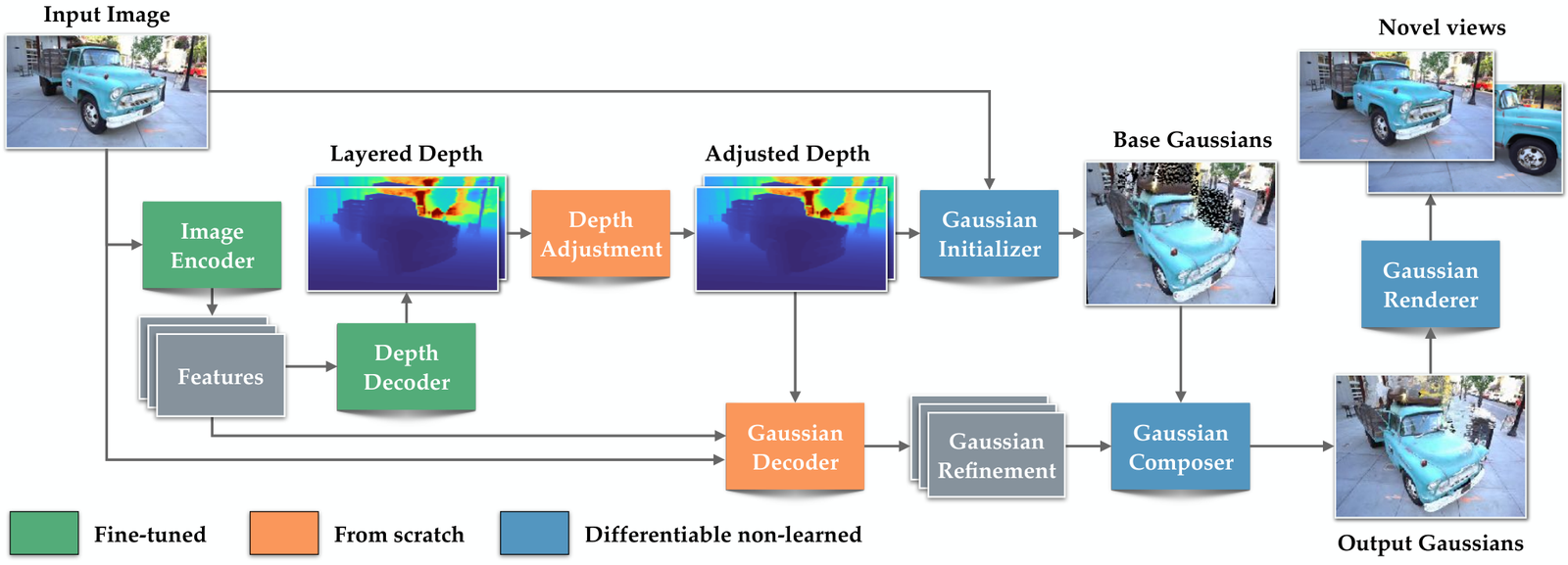
The pieces, as the paper and the code describe them:
- A Depth Pro encoder and decoder. SHARP resizes every input to 1536 by
1536, exactly as Depth Pro does, and runs Depth Pro's two ViT-L encoders
(326M parameters each). The decoder's last convolution is duplicated, so
it predicts two depth maps instead of one: the first for the visible
surface, the second for whatever is behind it at depth edges. Like Depth
Pro 2, the network's depth output is turned into metres by the focal
length: the code passes
disparity_factor = f_px / widthand divides by the predicted disparity. - Base Gaussians from that depth. Both depth maps are min-pooled by 2, to 768 by 768, and a Gaussian is placed at every cell of each, at its depth, coloured with the average of its 2 by 2 pixels, scaled in proportion to its depth (so it is about a pixel wide), with opacity 0.5 and no rotation. That is Gaussians for every photo, whatever its size.
- A Gaussian decoder, 7.8M parameters trained from scratch, reads the features, the image and the depth and predicts a small correction to every attribute of every Gaussian, about 16.5 million numbers per image.
- Unprojection. The Gaussians are predicted in a normalised space that ignores the camera and mapped to metres with the intrinsics at the end.
The whole network has 702M parameters, 340M of them trained. The depth-adjustment module in the figure rescales the predicted depth towards the ground truth during training only, so a depth guess of the right shape and wrong scale does not poison the view-synthesis loss; at inference it is the identity, and the scale comes from the focal length. Training renders the Gaussians into the input view and a second view and compares them with photos (L1, a perceptual loss with Gram matrices that does most of the work on what gets painted into holes, an alpha loss, a depth loss), first on synthetic scenes, then on real single photos using SHARP's own renders as pseudo second views.
The results on the paper's Table 1 are strong for what it measures: views near the input, scored with DISTS and LPIPS on six datasets none of which were used in training. SHARP is best on every column. On ScanNet++ it scores 0.071 DISTS and 0.154 LPIPS against Gen3C's 0.090 and 0.227, and Gen3C, a video diffusion model, takes about 830 seconds per scene on an A100 against SHARP's 0.91 (Table 6). The paper's own claim is a 25 to 34% LPIPS reduction and 21 to 43% DISTS reduction over the best prior model.
Why it only holds near the photo
The paper is direct about its scope. Its goal is "natural posture shifts in AR/VR headsets", not "walking around" in the photograph, and Appendix D.6 measures quality against how far the camera moves: SHARP is best below half a metre of baseline, and still best or second best up to 3 metres on most datasets, while Gen3C, a diffusion method that invents content for far-away views, overtakes it only on ETH3D beyond 3 metres and on ScanNet++ beyond half a metre. Its failure cases (Appendix D.7) are all depth failures: a macro photo of a bee whose shallow depth of field puts the bee behind the flowers, a starry night sky reconstructed as a curved surface, and a reflection in water read as a mountain. "These failures are root caused by the depth model," the authors write.
The reason it degrades with distance is visible in its structure. There are exactly two Gaussians per 2 by 2 pixel cell, and every one was placed on a ray of the input camera. The first layer is the surface the photo shows. The second layer is the only thing that can be behind it, and only where the network chose to put it there. Move the camera a little and the first layer covers almost everything, the second can fill the thin slits that open at edges, and the perceptual loss has trained both to look plausible. Move it a lot and you see past both, to where nothing was ever placed, and you see the first layer's Gaussians edge-on, as streaks, because each was shaped to look right from one direction.
The step-through does this for one column of pixels in a toy scene: a floor, a low wall and a back wall. Steps 1 to 4 are the back-projection every depth-based method does, step 5 adds a second layer behind the low wall, and step 6 renders the column from a lifted camera. Untick the second layer and the floor behind the wall comes out as red holes; tick it and they fill, until the lift outruns both layers.
SHARP on a 3090, and what its two layers actually do
I ran SHARP's released checkpoint (702.3M parameters, as the paper says) on six CC0 photos, the four in the viewer plus a hospital corridor and a garden, and on the 24 TUM frames.
Speed. One forward pass at 1536 by 1536 took a median 1,248 ms in float32 on the 3090, with 10.99 GiB reserved at peak. Under float16 or bfloat16 autocast it took 493 ms, which beats the paper's 0.91 s on an A100; I did not check whether the half-precision splats differ from the full-precision ones, so take that as a speed, not a recommendation. Turning the network's output into metric Gaussians took another 3.7 s, almost all of it the CPU decomposing 1,179,648 covariance matrices with a float64 SVD in the released code. "Less than a second" is the network.
The focal sweep. For each photo I ran SHARP three times: with the EXIF focal length, with Depth Pro 2's estimate, and with its own 30 mm fallback. The result is the derivation from earlier, to three decimals. On every photo the median depth of the splat's front layer scaled exactly with the focal length (the hall with 30 mm: focal ratio 1.111, depth ratio 1.111), and the 5th-to-95th-percentile width of the splat did not change at all (ratio 1.000 on all six). A SHARP splat of a photo with no EXIF is 7 to 15% too deep on these six photos, and correctly wide.
How metric the splat is. On the TUM frames, given the calibrated focal length, the depth of SHARP's front-layer Gaussians lands with a median ratio of 1.002 to the Kinect and an AbsRel of 0.076, 0.051 with the scale removed. That is as good as Depth Pro 2-H+ on the same frames (0.081 and 0.054), which surprised me. SHARP's depth is Depth Pro's, fine-tuned end-to-end for view synthesis, and on indoor scenes at these distances that fine-tuning has not hurt it. With the 30 mm default the ratio is 1.071 (a Kinect is close to a 30 mm equivalent lens, by luck); with Depth Pro 2's estimate it is 1.210, the estimator's error on the distorted frames again.
The second layer. I expected the second layer to sit behind the first at depth edges and nowhere else. It does not look like that in the output. Across the six photos, the second layer's Gaussians are as opaque as the first's (mean opacity 0.88 to 0.97 for both), and for nine in ten of the visible ones the gap between the two layers' depths is under 1% (the 90th percentile is 0.3 to 0.8% depending on the photo); between 48% and 81% of them sit a hair behind the first layer rather than in front. In these photos the second layer is mostly a second coat on the same surface, with the real separation, the part the step-through draws, confined to a small share of pixels along depth edges. The paper says the second layer "may represent occluded regions and view-dependent effects"; on these photos its depths say it mostly stays on the visible surface, which fits the second reading better than the first.
The splats in the viewer are not SHARP's full output, so here is what was cut. To fit each scene in about 8 MB, every one of SHARP's 589,824 cells (768 by 768) keeps its more opaque Gaussian, and the rest of the budget goes to the other layer in order of opacity. That keeps 589,824 to 668,218 of the 1,179,648 Gaussians per photo: between 23,207 and 78,394 second Gaussians in the hall, cabin and facade, and none in the courtyard, whose one-per-cell file alone came to 8.0 MB. Positions are 24-bit, good to a tenth of a millimetre. Because every cell keeps a Gaussian, the photo's own viewpoint is closed, and the black at the edges of the swing is SHARP's rather than mine: nothing exists past the photo's frame, and where the second layer stays on the first surface there is nothing behind the pillar either. (My first export kept Gaussians by opacity alone and left 37 to 44% of cells empty; its holes were bigger.)
What the Vision Pro clip shows, and what pairs with what
The clip that made the rounds is Bihe Xi's, posted on 18 November. His own post says what is in it: the interaction was written with an AI coding tool, the scene is "one photo turned into a 3D scene with ML-SHARP", the leaves are from Tripo, and it runs on Apple Vision Pro. That is the use SHARP was designed for, a stable 3D view of a photo for a head that moves a few centimetres. Watch the edges of the scene as he leans in: the lawn ends in a soft fringe where the photo ended. Asked in the replies which model made the splat, he answered "ml-sharp from apple", and a reply pointed out what anyone building on it should know: the licence does not allow commercial use.
On how SHARP and Depth Pro 2 relate, the code is clear. SHARP's monodepth is Depth Pro, version one, with both ViT-L encoders and a fine-tuned decoder. It has no focal estimator of its own; it reads EXIF or assumes 30 mm. Depth Pro 2 does not replace SHARP's depth in any released code, and Depth Pro 2's own appendix on novel-view synthesis uses a different renderer entirely (Tiled Multiplane Images with four planes) to compare depth maps, with a fixed focal length of 0.58 times the image width.
SHARP has also turned up inside other people's pipelines. The Solv3R demo in the last reconstruction roundup seeds its splat training with SHARP splats from key frames, and SplatAnything scores its views with LPIPS and DISTS following SHARP's argument that PSNR rewards blur.
The piece that does transfer is the focal estimator. SHARP takes a focal length as a number. Give it the estimator's number instead of 30 mm and its splat gets the estimator's scale. That is a three-line change, and I tried it, below.
SplatLab: what people want to do with a splat next
The fourth post answers the question a splat raises next: now what? A splat is a cloud of coloured blobs with no objects in it. You cannot select the chair or move the table, and if you could, there would be nothing behind it.
SplatLab is Eros Carrasco's attempt at that. What is public is a LinkedIn post, a project page with two live scenes, and a 40-second video. The post lists four things the engine does: it "finds the objects in a scan and segments them", lets you "move them, take them out, or reuse them in another scan", "fills in what the scanner never saw, like the gaps left after moving objects", and lets you "relight the full environment and even add new lights". He showed it at Adobe MAX in Miami on the ASUS ProArt stand, trained on a pair of ASUS Ascent GX10 machines. The Japanese post that spread it adds measuring walls and objects; that is not in his text, and I did not see it in the video, so I would treat it as unverified.
There is no paper and no repository, so I cannot say how any of it works.
The demo page is more forthcoming than most, because its viewer script is
commented in prose. The scenes are PlayCanvas compressed PLY files "in
metres", written by a script the comments name as effects/web_ply.py in
"the splatlab repo", which is not public. The editable break room comes in
pieces: the room "bare with the floor and walls made where things stood",
what stays in it, and a small file for each object that can be carried, with
its outline on the floor and its height in a things.json. Reading the
headers of the published files: the bare room is 1,628,257 splats, what stays
in it 550,000, and things.json lists 13 objects that can be carried (seven
round tables, a beige table, a side table, a bin, a kitchen island, a blue
barrel and a white stool) totalling 232,813 splats, the tallest 1.62 m. That is the
architecture you would expect: segment, cut out, inpaint the hole in the
room, keep each object as its own splat. The booth scene was scanned with an
XGRIDS PortalCam, a multi-view capture device, not from a photo.
So SplatLab is about editing splats that came from a proper capture, where the floor behind a table was at least partly seen from other angles. On a single-photo splat the same editing hits the wall the step-through shows: take the table out of a SHARP scene and behind it is the second layer, a thin guess, and behind that nothing.
What this means for reality capture
My day job includes turning 360° and fisheye site walks into metric, gravity-aligned splats, meshes and point clouds, and from those into BIM. So the question I care about is narrow: where could a metric depth from one frame, or a splat from one photo, sit in a pipeline whose output someone will measure?
Not as the geometry. A capture pipeline gets its metres from many views: structure from motion over hundreds of frames, scale from an IMU or a known baseline, then dense matching or splat optimisation that every frame constrains. Monocular depth gets its metres from a learned sense of how big things look. On my frames that sense was 6% short at a metre and 7% long beyond four, which at five metres is about 35 cm. A wall in a BIM model has to be within a centimetre or two. The capture pipelines piece and the latest reconstruction roundup are about the tools that get there; one photo replaces none of them. Accord is what happens when a depth model is held to an IMU's metres instead: each window of depth anchored to points the filter triangulated, and every overlapping pair of images made to agree.
As a prior, yes. Construction sites are made of the surfaces multi-view matching cannot match: bare plaster, painted drywall, concrete floors. A monocular depth aligned per frame to the sparse structure-from-motion points fills those walls with a plausible surface instead of noise, and Depth Pro 2's sharp edges keep a door frame from smearing into the wall. Its depth edges and its infinite sky are also a cheap second opinion for masking out the operator, the tripod and the sky, and a per-frame depth at walking pace is enough to flag a room that was never seen from close enough, before the expensive reconstruction runs.
In a 360 pipeline the focal length comes for free. I did not expect this when I started reading. Depth Pro 2 is a pinhole model, so a panorama goes in as six cube faces, and a cube face has a 90° field of view by construction:
No EXIF, no estimator, no 30 mm guess: the reprojection gives the focal length exactly, and with it the depth axis. What it does not give is agreement between faces, each predicted alone. The multi-frame mode could let the six faces attend to each other in one pass, but six views from one centre are not what it was trained on, so whether that helps the seams is something to measure, not assume.
Where it fails. Absolute error grows with distance, so a facade is worse than a room. Glass is the weakest case in the paper's own tables (Booster, 43.1 δ1 with its own focal length), and the courtyard in the viewer shows a glass wall whose reflection became a picture painted on it. Sky is infinite in Depth Pro 2 and has to be clipped; in SHARP it is a far-away sheet of Gaussians. A white wall's distance comes only from context, the floor line and the doors around it, which is right in an ordinary room and fragile in a bare site. And the estimator is a prior learned from Flickr, so machine-vision cameras, crops and distorted lenses are outside it, as the freiburg1 frames showed.
The licence decides the rest. Depth Pro 2's weights are under Apple's Machine Learning Research Model licence, "for research use only: non-commercial scientific research and academic development", and SHARP's under the same family of terms. Neither can go into a product that measures buildings for paying customers. The ideas transfer (focal-normalised output, a separate focal estimator, native resolution, frames attending to each other); the weights do not.
What I think
Depth Pro 2 is the best monocular depth model I can name for anyone who needs metres, sharp edges and steady video from one camera, and it is a cleaner design than its predecessor: one ViT at the input's own resolution, a few blocks that let frames see each other, and a loss that asks the predictions to agree after warping. None of those ideas is new on its own. Putting them together and measuring the trade-off they break is the contribution, and the paper's ablations are unusually frank about which parts carry it (native resolution and aspect ratio for edges, internal phone data for indoor scale, cross-frame attention for steadiness).
The focal estimator is the part I would take even if I took nothing else. It is small, it is honest about what it is (a prior over cameras), and it closes the one gap every focal-normalised depth model has. It should have been its own release, and in effect it is.
SHARP is a lovely piece of engineering for exactly what it says, a photo you can lean into, and nothing more. A splat from one photo is a relief, not a scan: two layers on the input camera's rays, the second one a learned guess, metric only as far as the focal length it was handed and the Depth Pro guess it was built on. Use it for what the Vision Pro clip shows. Do not measure anything in it.
For reality capture, Depth Pro 2 is a better prior than the ones I have used, and its research-only licence keeps it out of anything that ships. The idea I am keeping from this week is the arithmetic in the second section: monocular depth gets the sideways geometry right without any focal length, and the depth axis right only with one. Any pipeline that uses these depths should carry the focal length as a first-class input, with its source (EXIF, estimator, cube-face geometry) recorded next to it, because that one number decides whether the room is the right depth.
What I ran and what I read
Ran, on one RTX 3090 (PyTorch 2.8, CUDA 12.8 wheels), from
ml-depth-pro-2 at commit aa389cb and ml-sharp at aed6527, with the
weights from Apple's CDN: the focal estimator on 51 Commons photos and 24 TUM
RGB-D frames; all four Depth Pro 2 sizes on the TUM frames against Kinect
depth; the timings; Depth Pro 2-H+ on the six scene photos for the depth maps
and the widget's grids; SHARP on the same photos and frames, with the focal
sweep, the layer statistics and the SPZ export. The SPZ writer is mine (Niantic's
version 2 layout, round-tripped to 0.12 mm) and Spark decodes it in the page.
Read, not run: every number attributed to the Depth Pro 2 paper (Tables 1 to 6, 13 and 19 to 23), the SHARP paper (Tables 1 and 6, Appendices D.6 and D.7), the model cards, both repositories' code, and SplatLab's post, page and published file headers. The photos are CC0 and credited on the viewer; the TUM frames are CC BY 4.0. Depth Pro 2 and SHARP weights are research-only, and so, I would assume, are the splats in the viewer, which is why they are here to look at and nothing else.